Darts
This guide demonstrates every dart feature provided by the sewpat library.
Each example uses the same simple bodice-front block (120 × 180 mm,
with a construction grid showing shoulder, bust, waist and hem lines) so the
geometry stays easy to follow across all showcases.
Regenerate all SVGs from the repo root:
What is a Dart?
A dart is a stitched wedge that adds three-dimensional shaping to a flat piece of fabric — the most common examples are bust darts and waist darts.
In sewpat a dart is always defined by four key points:
| Point | Role |
|---|---|
leg_a / leg_b |
The two mouth endpoints on the seam line |
center |
Mid-point of the mouth; the fold/crease line starts here |
tip |
The apex — where the dart is stitched to a point |
Secondary geometry (width, depth, intake_angle, stitch lines, fold
line, dart roof) is derived automatically as properties.
API Quick Reference
Constructing a dart
Direct construction — supply all four points yourself:
from sewpat import Dart, DartType, Point

dart = Dart(
    leg_a=Point(40, 100),
    leg_b=Point(60, 100),
    center=Point(50, 100),       # mouth midpoint
    tip=Point(50, 40),           # 60 mm deep
    dart_type=DartType.TRIANGLE, # or DartType.RHOMBUS
    name="Waist Dart",
)
Factory methods — place a dart on an existing edge:
from sewpat import Dart, DartType, MM

# Option A — explicit depth, orthogonal to the edge at parameter t
dart = Dart.from_edge_at_t(
    side_seam_elem,          # PatternElement or Segment/CubicBezier/Ray/Line
    t=0.55,                  # 0 = start of edge, 1 = end
    width=22 * MM,
    depth=60 * MM,
    dart_type=DartType.TRIANGLE,
    name="Side Seam Dart",
)

# Option B — explicit depth at a fixed point on the edge
dart = Dart.from_edge_at_point(
    side_seam_elem,
    point=waist_side,        # Point on (or near) the edge
    width=22 * MM,
    depth=60 * MM,
)

# Option C — tip aimed at a reference point (e.g. bust point)
dart = Dart.from_edge_free_tip(
    side_seam_elem,
    t=0.38,
    width=28 * MM,
    reference_point=bust_point,
    tip_shortfall=25 * MM,   # stop 25 mm short of the bust point
)

# Option D — supply tip and mouth centre + width
dart = Dart.from_tip_center_width(tip, center, width=22 * MM)

# Option E — supply tip and both mouth endpoints explicitly
dart = Dart.from_tip_and_legs(tip, leg_a, leg_b)
When a PatternElement is passed, its style is stored on dart._edge_element
and automatically inherited by the dart roof segments — no
manual style threading needed.
Adding a dart to a PatternPart
result = part.add_dart(
    dart,
    stitch_style=STYLE_DART_STITCH,  # optional override
    fold_style=STYLE_DART_FOLD,       # optional override
    precision_style=None,             # optional override
    notches=True,                     # notch triangles at leg_a, leg_b and roof
    precision_tip=True,               # precision circles at the tip
)
# result.dart       — the Dart geometry object
# result.elements   — all PatternElements created, tagged by role:
#   "dart_stitch"   stitch lines (tip → leg_a, tip → leg_b)
#   "dart_fold"     crease line (center → tip)
#   "dart_roof"     dart roof outline segments (leg_a → roof, leg_b → roof)
#   "dart_tip"      precision circles + name label at the tip
#   "dart_notch"    notch triangles
Order matters
Call add_dart() before add_seam_allowance().
The two roof segments are added as is_outline=True with
corner_join="miter" so the seam-allowance engine folds correctly
across the dart mouth.
The Dart Roof
When a triangle dart is folded and sewn, the raw mouth edge becomes uneven. The dart roof is a corrected mouth-centre point displaced outward from the seam edge, ensuring the mouth lies flat after the dart is closed. The displacement height is:
The two roof outline segments leg_a → roof and leg_b → roof replace
the straight mouth edge in the outline. add_dart() handles this automatically.
Access the roof point directly:
Splitting a dart
dart_a, dart_b = dart.split(ratio=0.5)   # ratio ∈ (0, 1)

part.add_dart(dart_a, notches=True, precision_tip=True)
part.add_dart(dart_b, notches=True, precision_tip=True)
Both sub-darts share the exact same tip; the intake angle is divided proportionally.
Transformations
All methods return a new Dart (immutable style):
dart.translate(dx, dy)         # shift all four points
dart.rotate(pivot, angle_rad)  # CCW rotation — the pivot method for dart transfer
dart.split(ratio=0.5)          # → (dart_a, dart_b)
Geometry Properties
dart.width           # mouth opening in mm  (leg_a ↔ leg_b distance)
dart.depth           # depth in mm          (center ↔ tip distance)
dart.intake_angle    # full angle in radians (leg_a–tip–leg_b)
dart.roof            # Point — dart roof peak
dart.fold_line       # Segment: center → tip
dart.stitch_line_a   # Segment or CubicBezier: tip → leg_a
dart.stitch_line_b   # Segment or CubicBezier: tip → leg_b
dart.mirror_tip      # Point — second apex for rhombus (tip reflected across mouth)
dart.effective_second_tip  # second_tip if set, else mirror_tip
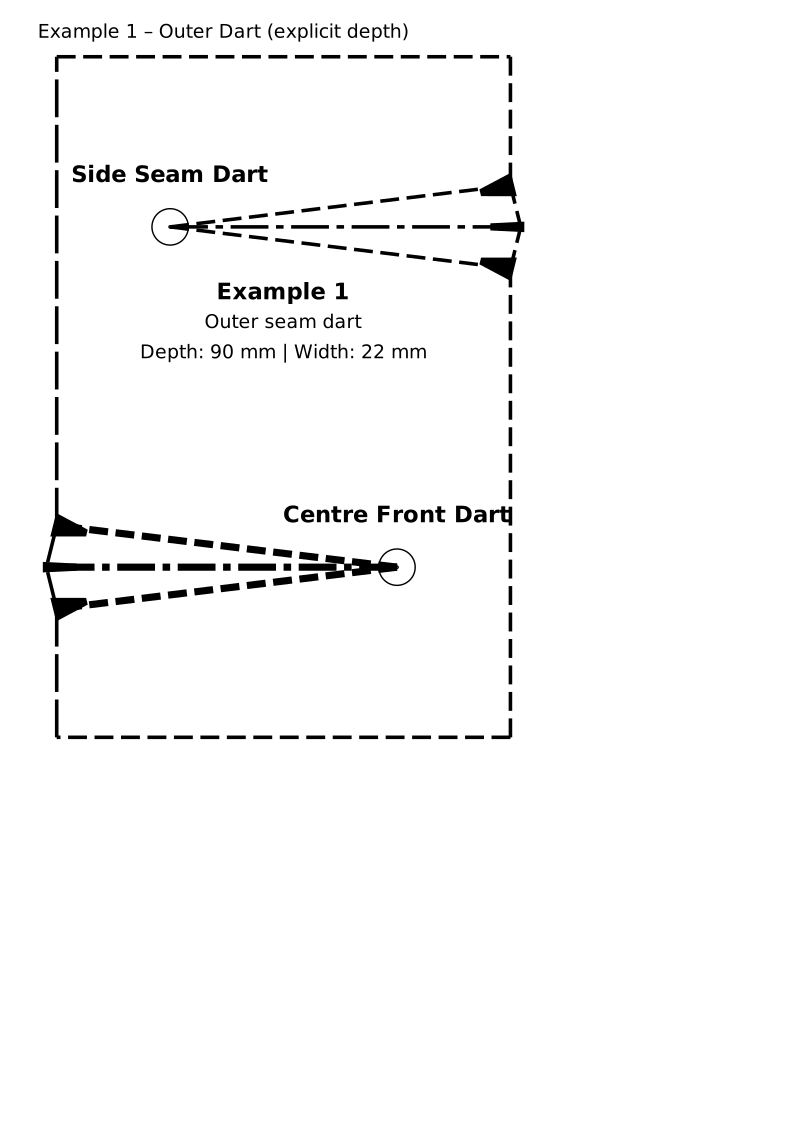
Example 1 — Outer Dart, Explicit Depth
Two darts on two different edges of the same bodice block. The edge style
is automatically inherited by the dart roof segments — no manual
style argument is needed:
| Dart | Edge | Inherited style |
|---|---|---|
dart_right |
segs["side"] — side seam (STYLE_STITCH, dashed) |
roof segments are dashed |
dart_left |
segs["cf"] — centre-front (STYLE_FOLD, long-dash) |
roof segments are long-dashed |
dart_right = Dart.from_edge_at_t(
    segs["side"],
    t=0.25, width=22 * MM, depth=90 * MM,
    dart_type=DartType.TRIANGLE, name="Side Seam Dart",
)
part.add_dart(dart_right, stitch_style=_DART_STITCH, fold_style=_DART_FOLD,
              notches=True, precision_tip=True)

dart_left = Dart.from_edge_at_t(
    segs["cf"],
    t=0.25, width=22 * MM, depth=90 * MM,
    dart_type=DartType.TRIANGLE, name="Centre Front Dart",
)
part.add_dart(dart_left, notches=True, precision_tip=True)
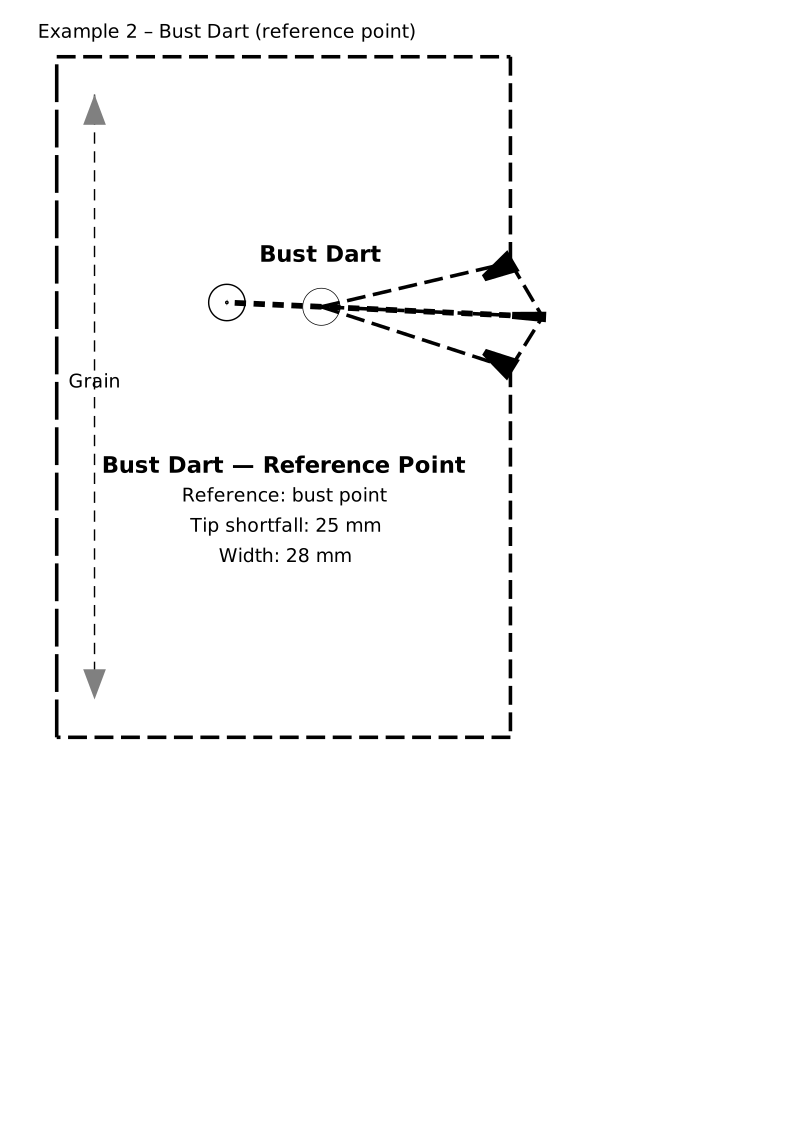
Example 2 — Outer Dart, Reference Point (Bust Point)
A side-seam bust dart aimed at the bust point. Instead of an explicit
depth, a reference_point is given and the tip is placed by moving
tip_shortfall mm along the fold line away from it.
dart = Dart.from_edge_free_tip(
    segs["side"],
    t=0.38, width=28 * MM,
    reference_point=pts["bust_point"],
    tip_shortfall=25 * MM,
    dart_type=DartType.TRIANGLE, name="Bust Dart",
)
part.add_dart(dart, stitch_style=_DART_STITCH, fold_style=_DART_FOLD,
              precision_style=_PRECISION, notches=True, precision_tip=True)
The bust point itself is shown as a precision mark on the construction grid.
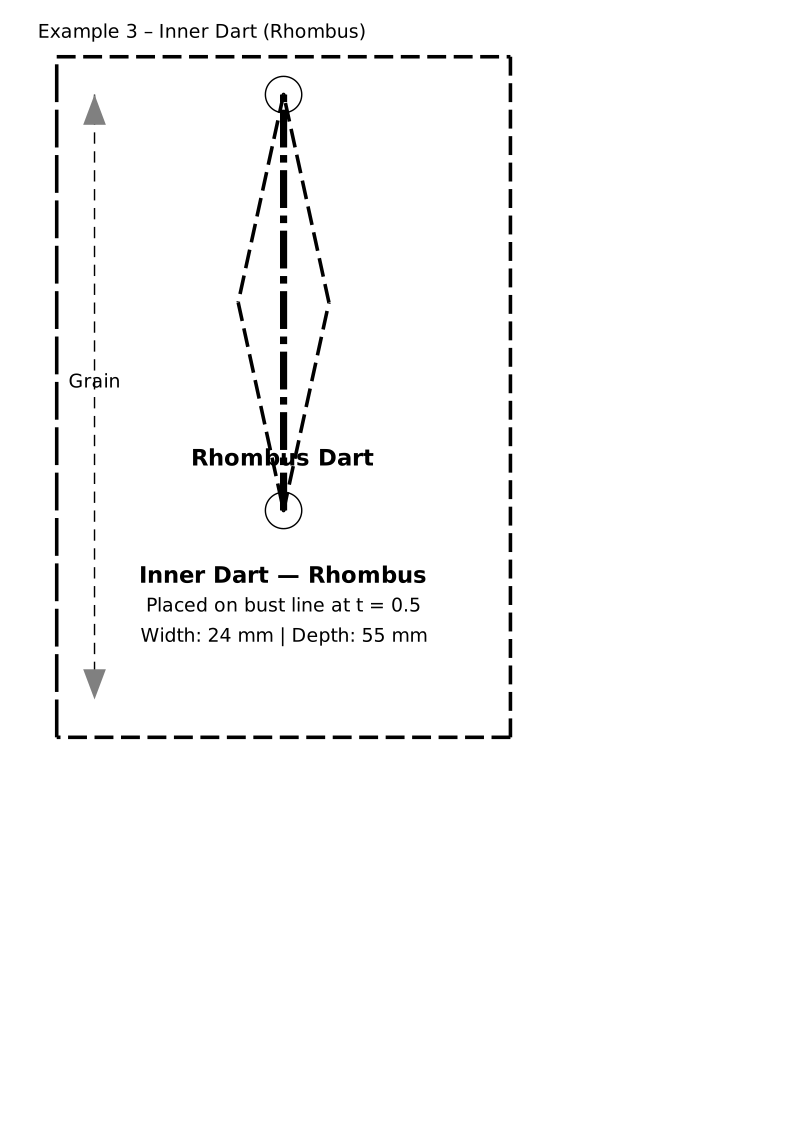
Example 3 — Inner / Reverse Dart (Rhombus)
An inner dart on the bust line rendered as a rhombus: four dashed
stitching segments form a closed diamond (leg_a → tip → leg_b → second_tip → leg_a).
Use DartType.RHOMBUS for princess-seam constructions or any dart that
opens inward.
bust_line_elem = PatternElement(
    Segment(pts["bust_cf"], pts["bust_side"]), style=_STITCH
)
dart = Dart.from_edge_at_t(
    bust_line_elem,
    t=0.5, width=24 * MM, depth=55 * MM,
    dart_type=DartType.RHOMBUS, name="Rhombus Dart",
)
part.add_dart(dart, stitch_style=_DART_STITCH, notches=True, precision_tip=True)
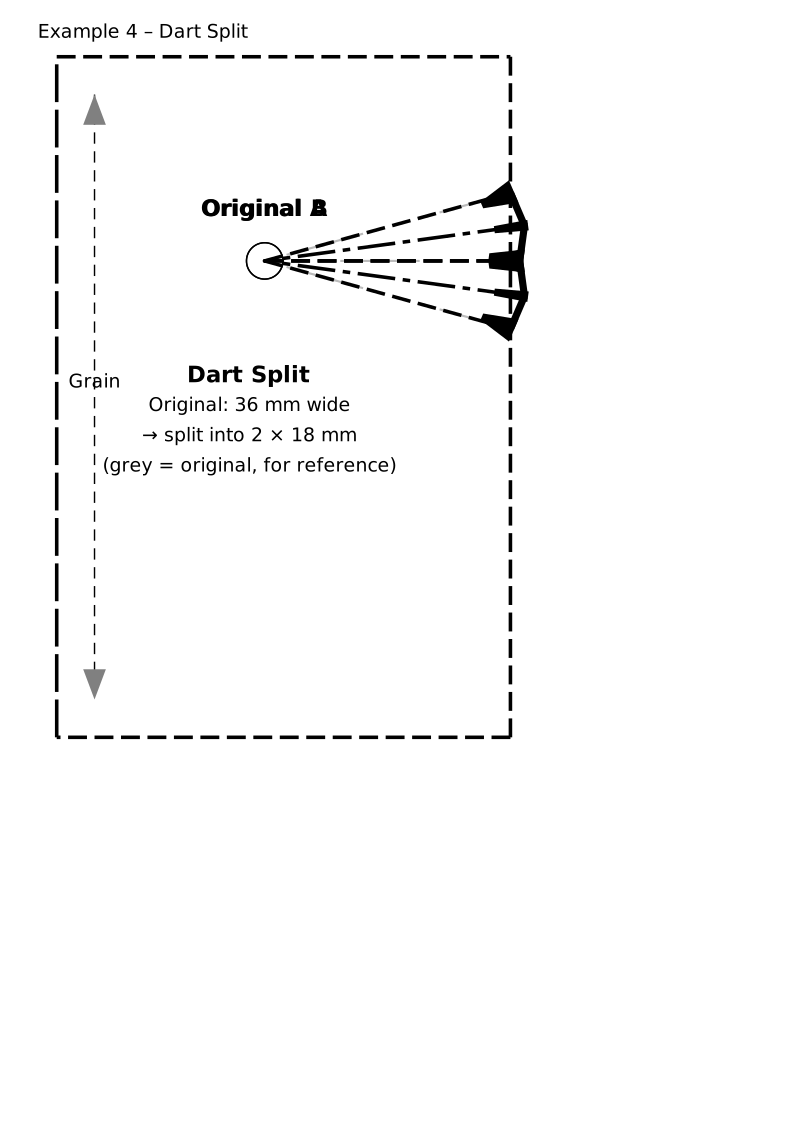
Example 4 — Splitting a Dart
One large dart (36 mm wide) is split into two equal sub-darts with
Dart.split(ratio=0.5). Both sub-darts share the same tip; the original
dart is shown in light grey as a reference.
original = Dart.from_edge_at_t(
    segs["side"], t=0.55,
    width=36 * MM, depth=65 * MM,
    dart_type=DartType.TRIANGLE,
)
dart_a, dart_b = original.split(ratio=0.5)
part.add_dart(dart_a, stitch_style=_DART_STITCH, fold_style=_DART_FOLD,
              notches=True, precision_tip=True)
part.add_dart(dart_b, stitch_style=_DART_STITCH, fold_style=_DART_FOLD,
              notches=True, precision_tip=True)
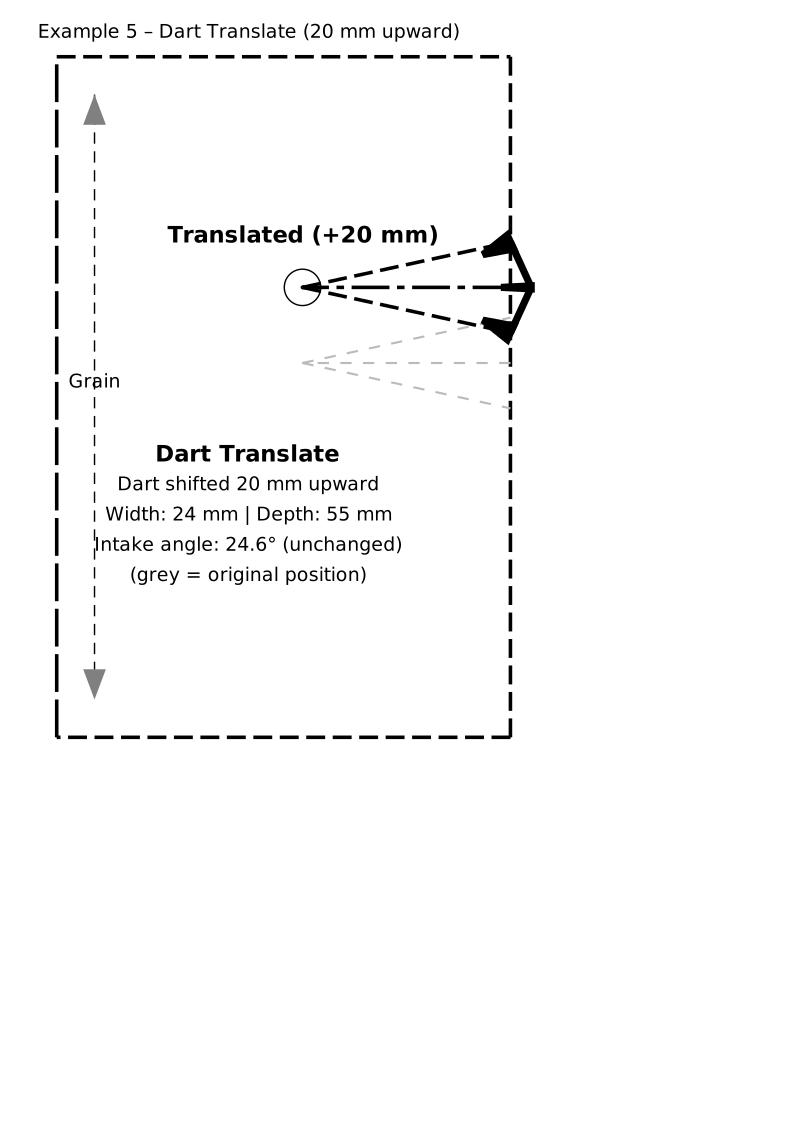
Example 5 — Sliding a Dart Along the Seam
Dart.translate(dx, dy) repositions a dart along its seam edge — for
example to move a waist dart 20 mm upward. Shape, width, depth and intake
angle are preserved exactly.
original = Dart.from_edge_at_t(
    segs["side"], t=0.65,
    width=24 * MM, depth=55 * MM,
    dart_type=DartType.TRIANGLE, name="Original",
)
moved = original.translate(dx=0, dy=-20 * MM)
part.add_dart(moved, stitch_style=_DART_STITCH, fold_style=_DART_FOLD,
              notches=True, precision_tip=True)
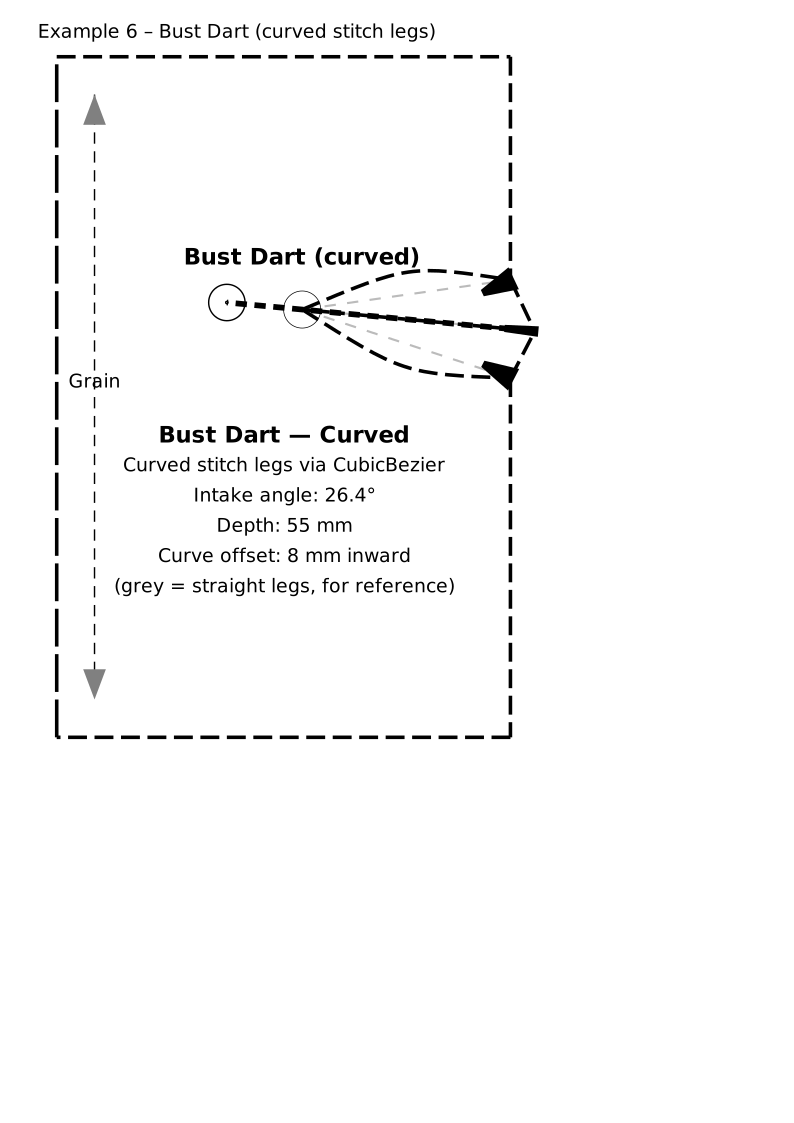
Example 6 — Bust Dart with Curved Stitch Legs
Real garment patterns often use gently curved stitch lines to improve the three-dimensional fit around the bust contour (curved-seam method).
curved = Dart(
    leg_a=leg_a, leg_b=leg_b,
    center=straight.center, tip=tip,
    dart_type=DartType.TRIANGLE, name="Bust Dart (curved)",
    stitch_curve_a=CubicBezier(tip, mid_a_in, mid_a_in, leg_a),
    stitch_curve_b=CubicBezier(tip, mid_b_in, mid_b_in, leg_b),
)
part.add_dart(curved, stitch_style=_DART_STITCH, fold_style=_DART_FOLD,
              notches=True, precision_tip=True)
Both control points are placed at an offset midpoint (symmetric tent), making the curve bow inward by ≈ ¾ × offset at its peak.
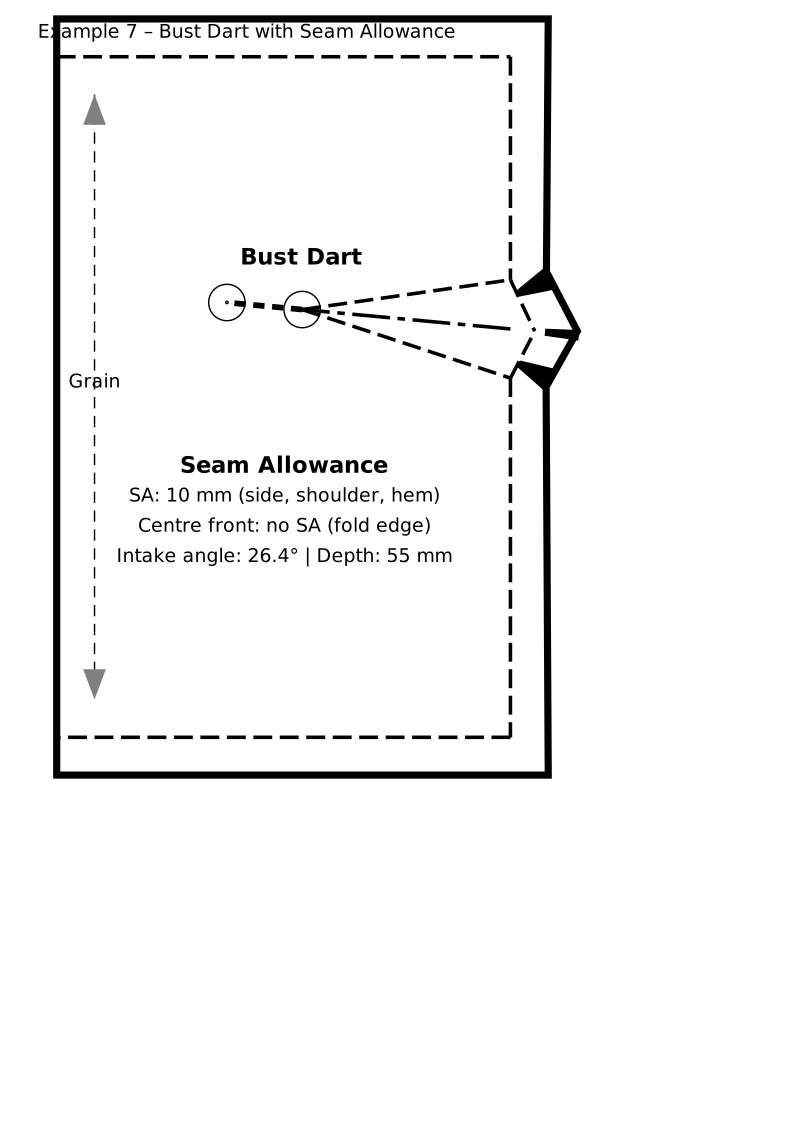
Example 7 — Dart with Seam Allowance
PatternPart.add_seam_allowance(distance) offsets the outline outward.
Always call add_dart() before add_seam_allowance().
part.add_dart(dart, stitch_style=_DART_STITCH, fold_style=_DART_FOLD,
              notches=True, precision_tip=True)
part.add_seam_allowance(distance=10 * MM)
The outer dashed line is the cutting line; the inner solid line is the sewing line.
Style Reference
| Constant | Usage |
|---|---|
STYLE_DART_STITCH |
Dashed stitching lines on dart legs; also the rhombus outline |
STYLE_DART_FOLD |
Long-dash–dot crease/fold line from mouth centre to tip |
STYLE_PRECISION_POINT |
Concentric-circle precision marks at the tip |
All three are available from the top-level sewpat import and can be
passed as stitch_style=, fold_style=, or precision_style= overrides
to add_dart().